Introduction:
In these days competitive
market, if you submit a resume then it is no longer just about impressing a
recruiter. Before a human ever sees your resume, it often goes through an applicant
tracking system (ATS). These systems act as a first gate keepers in the hiring
process, filtering, ranking and organizing resume at scale.
ATS is a software that
is used to collect, parse, and screen resumes automatically. With hundreds or
even thousands of applications received for a single job opening, most
organizations rely on ATS to save time, reduce manual effort, and improve
hiring efficiency.
For job seekers,
understanding how ATS works can be the difference between getting shortlisted
or rejected. For recruiter and HR professionals, knowing ATS behavior helps in
setting better filters and finding the right talent faster. This blog explores
how keywords, formatting and parsing work together in ATS resume screening and
how you can optimize resumes to pass ATS filter successfully.
What
happens when a resume is uploaded to an ATS:
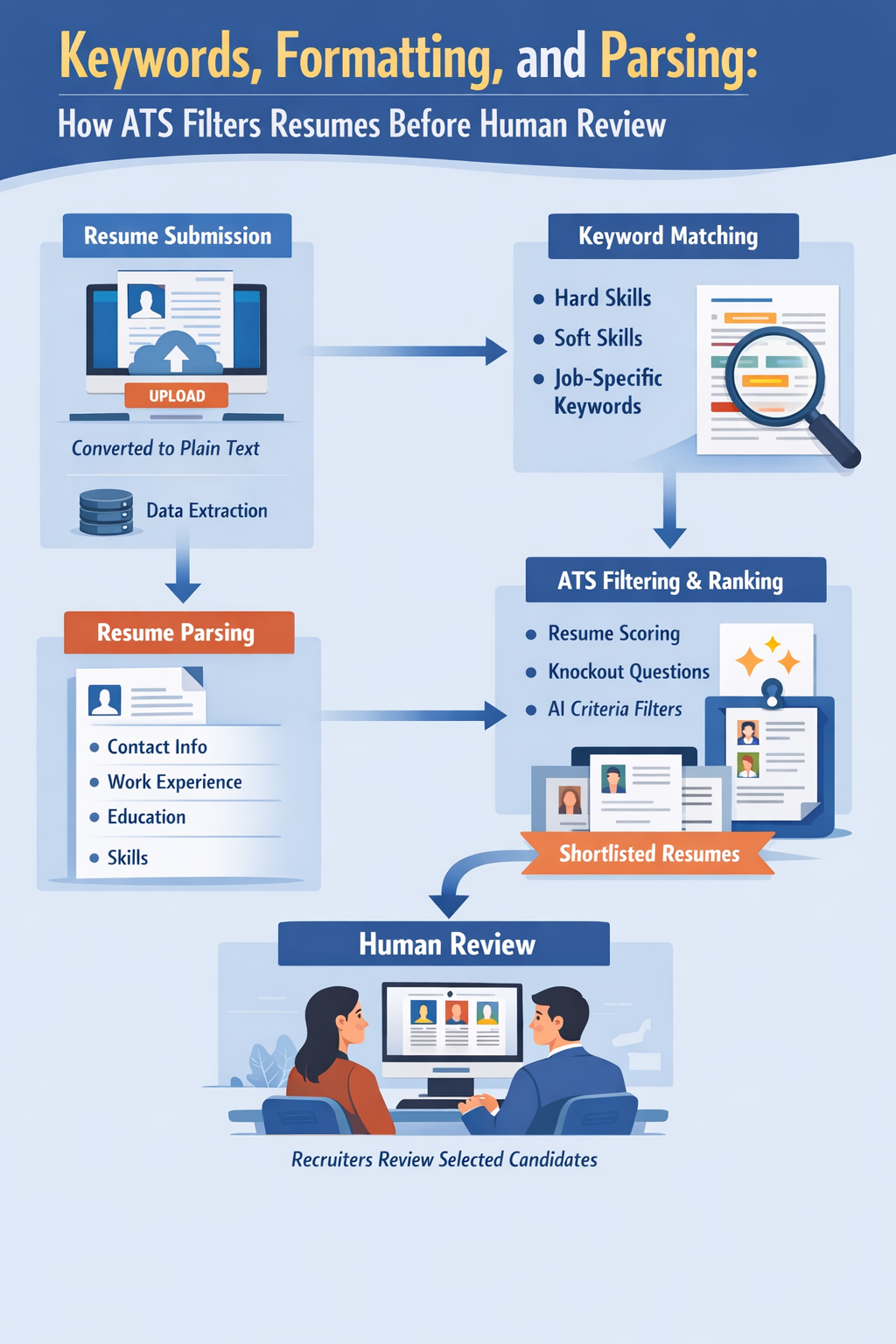
Resume submission process:
When a candidate
uploads resume on the portal, company career page, or recruitment platform then
immediately ATS beings processing the file. The resume can be submitted in many
formats like docx or PDF depending on the system’s compatibility.
Conversion into plain text:
The ATS convert the
uploaded resume into plain text. This
step is crucial because ATS software does not “see” resumes the way humans do. Visual
designs, colors, and graphics are stripped away leaving only readable text.
Data extraction and storage:
Once converted, the ATS
extracts key information such as:
- Name and contact details
- Job titles and work experience
- Education details
- Skills and certifications
This data is then
stored in the ATS database and used for keyword matching, filtering, and
ranking.
Role of keywords in ATS Resume screening:
What Keywords Mean in
ATS Screening
Keywords are specific
words or phrases that ATS systems use to match resumes with job descriptions.
These keywords are usually derived from the job posting itself.
Types of Keywords:
1. Hard Skills Keywords:
Technical or measurable skills such as:
o Python
o Data Analysis
o SEO
o Payroll Processing
2. Soft Skills Keywords:
Behavioral or interpersonal skills like:
o Communication
o Leadership
o Problem-solving
3. Role-Specific Keywords:
Job titles, tools, certifications, or industry terms such as:
o HR Generalist
o Digital Marketing Manager
o SAP HCM
How
ATS Matches Resumes with Job Descriptions:
ATS compares resume
content with job descriptions using keyword matching algorithms. Resumes with
higher keyword relevance score better and move ahead in the screening process.
Keyword Frequency vs
Relevance
Using keywords
repeatedly does not guarantee success. Modern ATS focuses on context and
relevance, not keyword stuffing. Keywords should naturally align with
experience and skills.
Common Keyword Mistakes
Candidates Make
- Copy-pasting job descriptions
without context - Using synonyms instead of exact
keywords - Missing critical technical or
certification terms - Overusing keywords unnaturally
How ATS Parses Resume
Content:
What Is Resume Parsing?
Resume parsing is the
process by which ATS software reads, analyzes, and categorizes resume content
into structured fields.
How ATS Reads Resume
Sections:
ATS expects resumes to
follow a logical structure:
- Contact Information: Name, phone number, email,
location - Work Experience: Job titles, company names, dates,
responsibilities - Education: Degree, institution, year
- Skills: Listed in a simple format
Parsing Errors Due to
Complex Layouts
ATS struggles with
resumes that include:
- Multiple columns
- Tables and text boxes
- Icons instead of text
- Graphics or charts
These elements often
cause data to be misplaced or skipped entirely.
Examples of Poorly
Parsed Resumes
- Contact details appearing in the
skills section - Job titles missing from work
experience - Skills not recognized due to
graphical representation
Impact of Resume
Formatting on ATS:
ATS-Friendly Resume
Formats:
- DOCX: Most ATS-compatible and safest
format - PDF: Acceptable only if text-based and
not image-heavy
Font Types and Sizes:
ATS can accurately read
standard fonts such as:
- Arial
- Calibri
- Times New Roman
Recommended font size: 10.5
to 12 points
Headings, Bullet
Points, and Spacing:
Use clear section
headings like:
- Work Experience
- Education
- Skills
Bullet points should be
simple and consistent. Avoid excessive spacing or decorative separators.
Why Tables, Text Boxes,
and Graphics Cause Issues:
ATS may not read
content inside tables or text boxes correctly. Columns can scramble the reading
order, leading to parsing errors.
Importance of
Consistent Section Labels:
Using standard labels
helps ATS recognize sections correctly. For example:
- Use “Work Experience” instead of
“Career Journey” - Use “Skills” instead of “Expertise
Matrix”
How ATS Ranks and
Filters Candidates:
Resume Scoring and
Ranking Systems
ATS assigns a score
based on:
- Keyword match
- Skills relevance
- Experience alignment
Resumes with higher
scores appear at the top of recruiter dashboards.
Knockout Questions and
Mandatory Criteria
Some ATS systems
include knockout questions such as:
- Years of experience
- Location
- Required certification
Failure to meet
mandatory criteria may result in automatic rejection.
AI and Rule-Based
Filters
Modern ATS uses a
combination of:
- Rule-based logic (yes/no filters)
- AI-powered resume matching
Shortlisting for
Recruiter Review
Only shortlisted
resumes reach recruiters for manual review, making ATS optimization essential.
ATS vs Human
Resume Review:
Automated vs Manual
Screening
ATS focuses on data
and keywords, while humans assess:
- Career growth
- Achievements
- Communication clarity
Why Strong Resumes Get
Rejected
- Poor formatting
- Missing keywords
- Parsing errors
- Not meeting ATS filters
How Recruiters Adjust
ATS Filters
Recruiters can modify
keyword weights, relax filters, or manually search ATS databases to find hidden
talent.
Best Practices to Pass
ATS Screening:
Tailor Resumes for Each
Job:
Avoid using one generic
resume. Customize keywords and skills for each job role.
Align Keywords with Job
Descriptions:
Use exact terminology
from job postings wherever relevant.
Use Simple and Clean
Layouts:
Stick to one-column
layouts with minimal design elements.
Test Resumes Using ATS
Check Tools:
Online ATS resume
scanners can help identify formatting and keyword issues before submission.
Common ATS Myths and
Misconceptions:
- “ATS rejects resumes automatically”
ATS filters, but humans make final decisions. - “Design-heavy resumes perform
better”
ATS prefers simplicity over visuals. - “More keywords guarantee selection”
Relevance matters more than quantity.
Conclusion:
Keywords,
formatting, and parsing work together to determine whether a resume reaches a
recruiter’s desk. Understanding how ATS reads, analyzes, and ranks resumes
significantly improves a candidate’s chances of shortlisting.
ATS
optimization does not mean compromising human readability. The goal is to
create a resume that is ATS-compliant, keyword-aligned, and
recruiter-friendly. By using clean formatting, relevant keywords, and
structured content, job seekers can successfully navigate ATS filters and stand
out in today’s competitive hiring landscape.